This site contains affiliate links to products or services that I recommend. Any purchases made through these links don’t add anything to your purchase price. It helps me keep the lights on and bring you quality travel tips. As an Amazon Associate, I earn from qualifying purchases. Thanks so much for your support!
Have you tried planning a long road trip only to find that many of the free planning maps and apps limit your stops to only 10 including your starting point? That’s one of the top reasons you need the RoadTrippers trip planner. In this post, I’ll share 12 reasons why the Roadtripper membership will save you time and money when planning your next adventure. Keep reading to get my promo code that offers you $5.00 off when you sign up for a paid membership, too.
Table of Contents for this Post
My Road Trip Experience
Our family has always loved road trips. I’ve lived in California, Ohio, Arizona, and Virginia, so I’ve covered a lot of ground over the years. I’ve traveled to 49 of the 50 United States [one of these days I’ll get to North Dakota], as well as several Canada, Mexico, and other international destinations. My husband and I love the flexibility of making our own schedule and having our own vehicle.
Our family has taken many long-distance cross-country road trips, plus dozens that were shorter routes that gave us a chance to dive deeper into many regions of America. I would have loved to have the Roadtrippers trip planner way back when I started traveling.
This link will take you to all my road trip posts.
You can see an example of my latest Roadtrippers map for our ultimate 2-month USA road trip here. And guess what? I’m working on a book about step-by-step trip planning, too. If you’d like to be the first to hear about my new resources, sign up for my email newsletter below. I don’t send emails often, but they’re always packed with tips and travel insights. Sometimes special discounts and promo codes are included as well.
What You’re Missing without Roadtrippers Trip Planner
Roadtrippers has so many helpful features that I can’t list them all in detail, but I’ll share some of the most important tools that you’re missing out on if you don’t have the app. Since I’m a hardcore road tripper, I’m going to mostly highlight the features of the Premium version, but if you don’t use an RV or don’t take as many long road trips, the Basic or Pro versions may work fine for you.
Plan for Up to 150 Stops with Roadtrippers
As I mentioned before, for me, this is probably the most important feature of the Roadtrippers trip planner app. The basic route of our 2-month USA road trip itinerary was nearly 40 stops and could have been more if I had added specific hotels, hiking trails, attractions, and other places where we stopped within towns and national parks.
For RVers who may be constantly traveling, this is such a time-saver. You can share your itinerary with others to let them know your route in case there’s an emergency.
You really can get as detailed as you want when planning an adventure. Being able to include every stop helps me recall and document the trip later for my readers too. If you enjoy scrapbooking or journaling on your road trips it’s a great way to keep track of everything you want to capture in your memory-keeping later.

Create Routes for Unlimited Road Trips
I absolutely love that the Premium Roadtrippers trip planner app has no limit on the number of trips you can create and save. This makes it easy to plan multiple adventures at a time. As a travel blogger, I always have something in the pipeline. I’m currently working on road trips to Banff and Glacier National Parks for next year, a few of Utah’s Mighty Five national parks for this fall, and some Arizona fall foliage routes coming up soon. With this app, I can work on them all at the same time.
Find Hundreds of Attractions and Route Ideas in Trip Guides
Not quite sure where you want to go, or don’t feel like starting from scratch? No problem. Just choose “Trip Guides” from the “Plan Your Trip” dropdown menu, then select a country from the drop-down. You’ll find a plethora of options to choose from for your next adventure. From the straightest road trip in Australia, covering 3 time zones, or maybe choose U.S. cemeteries with interesting graves and tombstones.
Choose a Trip Guide that interests you, then look at the map, read the guide, and “take the trip” to create a copy of the itinerary with the same stops. Then you can customize it for yourself.
Collaborate on Trips with Family & Friends
Do you travel with friends, family, or others? Do you let your kids have input into your family’s road trip decisions? Collaborating with your fellow travelers on road trips can help ensure that everyone has a say in certain aspects of the trip.
Trip collaboration is a Roadtrippers Pro and Premium perk that allows you to work on a trip with other travelers, even if they don’t have a Roadtrippers membership. Cool right? Fellow planners are required to create a free Roadtrippers account to join in the fun.
Each person that you invite can review the trip, edit, and add waypoints. Also, 24 hours after a trip has been saved or edited, an email is sent to everyone on the trip to let them know a change was made (you won’t get an email if you made the change).
Choose Your Own Unique Route Preferences
Do you prefer to take the road less traveled and avoid highways? The Roadtrippers trip planner can do that. What about avoiding Toll roads? They’re all over the place on the East Coast of the USA. The app can do that too. You can also set your route to avoid ferries and even dirt roads. We have a friend who refuses to drive on dirt and gravel roads because he had a stone fly up and crack his windshield once [which has also happened to us on a paved road]. He would love this trip-planning app for avoiding dirt roads alone.
Another cool feature is that if Roadtrippers can’t find a route using the criteria you’ve set, it will create an alternate route but show a yellow or red warning. The warning indicates that something doesn’t meet your avoidance criteria. For example, if you have your trip set to “avoid ferries” and you want to visit Put-in-Bay in Ohio’s Lake Erie, then you can’t get there without taking a ferry [unless you have a private boat]. You’ll see a warning in that section of the trip.
Find EV Charging & Gas Stations Along Your Route

Do you have an eco-friendly electric vehicle? Now you can use the Roadtrippers trip planner to find EV charging stations on or near your road trip route. With this feature, you can also find much-needed gas stations, public restrooms, showers, and rest areas. To save unnecessary detours you can filter by only what’s “open now” too.
EXPERT TIP: I recommend that you always double-check by going to the website link in the detailed description to make sure nothing has changed since it was last updated in the app.
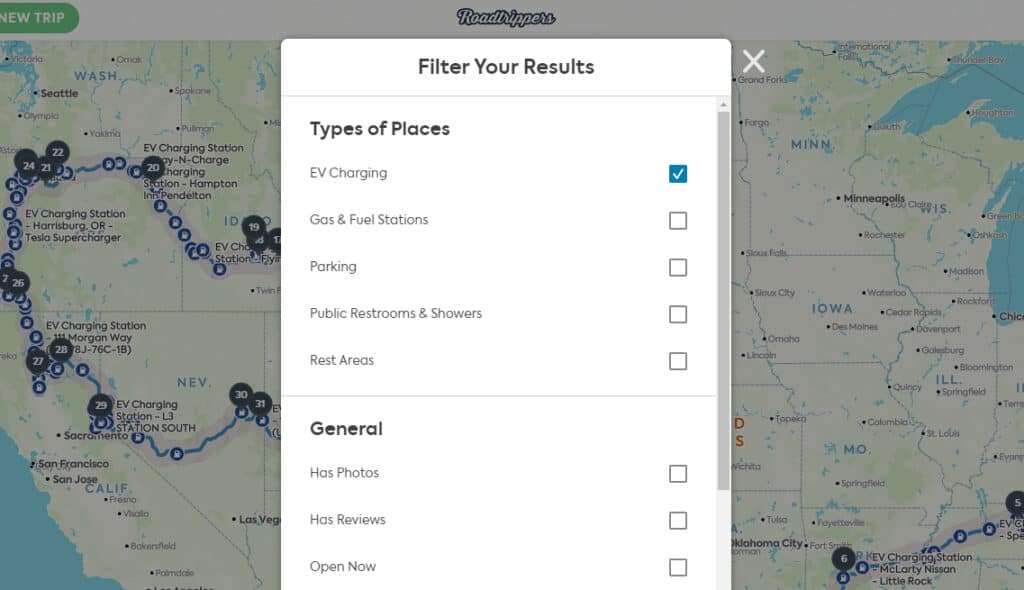
By the way, who’s with me in thinking that it would be great for restaurants and stores to add a couple of EV charging stations in their parking lots to entice travelers to dine and shop with them while charging their cars? Sounds like a brilliant idea to me.
In case you’re interested, here’s a map of the EV charging stations located in or near National Park Service properties. This makes a lot of sense too. Very eco-friendly and perfect to use when you stop at the Visitor Center or take a hike.
Use Roadtrippers on your Phone & Computer
If you’re like me, you may prefer to do your major trip planning on the larger screen of your computer. I like having multiple screens so I can multitask when I’m researching and building an itinerary. The good news is that with Roadtrippers, you can switch back and forth between your computer and your phone with the same itinerary, and it will sync any changes you make in either place, so you never have to keep track of the changes you made. You’ll also have access to everything while you’re on the road.
Plan Road Trips in the USA, Canada, New Zealand & Australia
Are you planning an epic road trip down under? The Roadtrippers trip planner database covers routes, destinations, attractions, and more for the United States, Canada, New Zealand, and Australia. They have plans to add more countries in the future too.
Choose How Far to Look Off Your Route for Things to Do
This is a clever feature! When you look at your trip on the Roadtrippers trip planner you may notice what they call the “route shade”. This is a shaded area on either side of your route that shows how far off your route you’re willing to go to visit places. It limits where places load when exploring each of the categories while planning a trip.
The route shade distance can be adjusted with the distance setting in the app. When you open categories on a trip, the radius is automatically set to 30 miles on the desktop version and 5 miles on the Roadtrippers mobile app. If you’re in a rush and don’t have much time to stray off your planned path, you can make the route shade smaller. If you have lots of extra time to explore a wider range, then set the route shade for a wider mileage range.
Find Campsites on Roadtrippers Too
Have you heard of Campendium or loved it for finding campgrounds and campsites? Many of the features from the Campendium app have been incorporated into Roadtrippers. You can use this set of features in Roadtrippers to find more than 50,000 campgrounds for your next adventure. There are also filters to find free sites and public lands. You can choose options to see where wildfire smoke and cell service coverage are on your maps to give you the best results in your campground search.
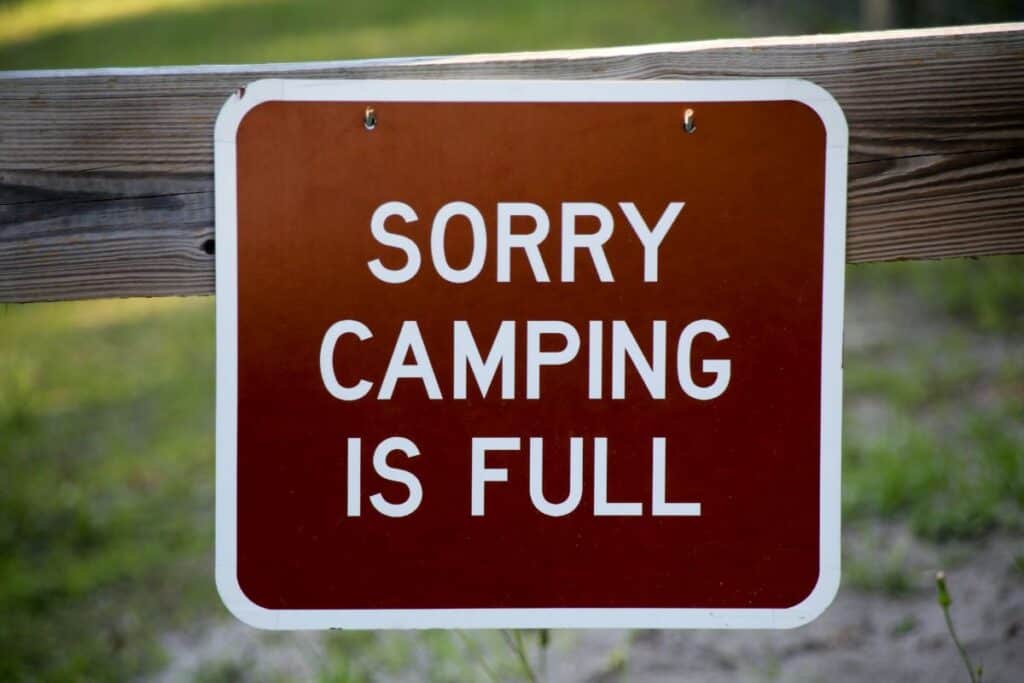
Pulling up to a sign like this after a long day of traveling can be your worst nightmare. When you use Campendium in Roadtrippers it will help you avoid issues like sold out campsites. You can also search for campsites by elevation, price, rating, discounts, property type, amenities and more.
Find RV-Friendly Routes on Roadtrippers
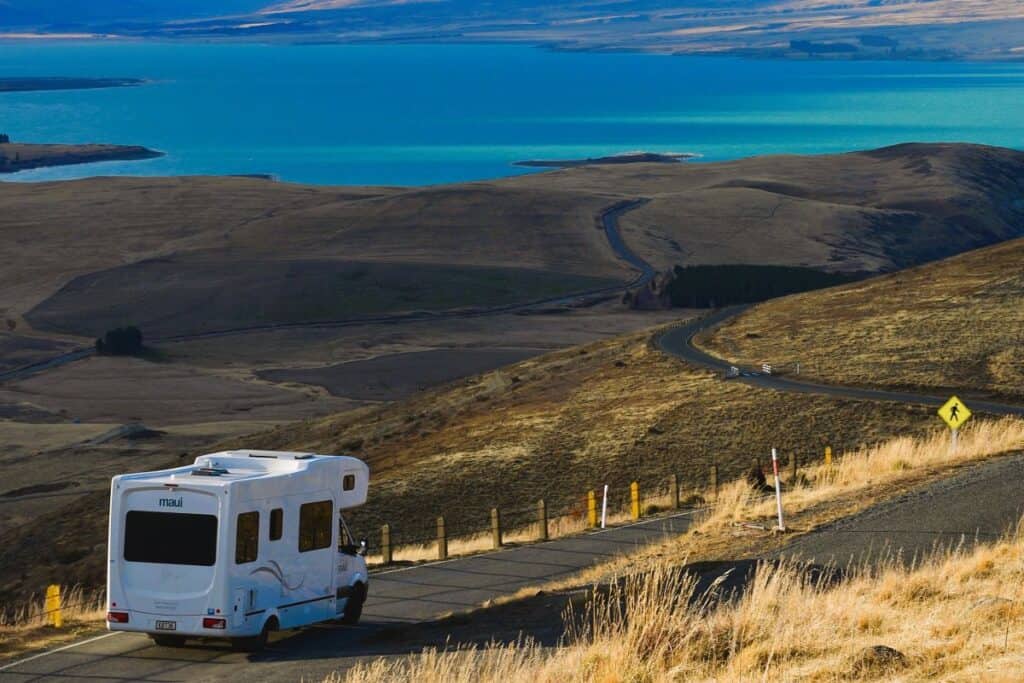
I’m not an RVer, but if I were, this feature would be a game-changer for USA road trips. All you have to do is enter your RV details, like vehicle dimensions, weight, accessories, attachments, etc. and the Roadtrippers trip planner will adjust your route to be RV-friendly, so you’ll avoid getting stuck where your RV won’t fit [like low bridges or roads with vehicle length limits]. It can even help you avoid areas that have propane restrictions.
Find 16,000 Overnight RV Parking Locations
Whether you’re a camper, RVer, or you just need to stop and sleep in your car for a while, Roadtrippers trip planner will help you find thousands of places to stop safely overnight. For some listings, you can check on the availability of spots and reserve your space right from the app.
Each RV and campsite listing provides tons of details including pet-friendly sites, amenities, addresses, a link to their website, whether they take credit cards, reviews, maximum RV length, laundry facilities, estimated nightly rates, and so much more. You’ll even find a phone number in case you have additional questions.
Create a Backup version for Offline Use
Here are a few ways to create and access your Roadtrippers itinerary so you’ll have it available, even when you’re not able to get cell or wifi service. They need to be done before you’re out of cell or wifi range, though.
Print Out Your Custom Trip Guide for the Trip
This may seem old school, and in the 21st century, it’s easy to rely on your phone for nearly everything, including directions. But what happens if you lose service in the middle of your trip? That can happen more than you realize if you like getting off the beaten path or even in the wide open spaces of the western USA or Canada.
With Roadtrippers, you can export your itinerary as a PDF and print it out before you leave. I like to keep mine in a 3-ring binder so I can jot down notes about our experiences as we go along, and I have a reliable backup, no matter where I am. Having that hard copy means you’ll stay on track and avoid unnecessary stress if Wi-Fi or cell service suddenly disappears.
Export Your Trip for Backup Navigation
Losing signal or dealing with a dead phone can quickly turn a road trip into a disaster, but Roadtrippers has another built-in safeguard. Paid members (Basic, Pro, or Premium) can export their full trip and waypoints as a GPX file, which can be uploaded to devices like Garmin, TomTom, Google Maps, or Gaia. Taking a few minutes to do this before you leave ensures you’ll always have a backup navigation plan—and the peace of mind that you won’t get stranded or miss a turn.
Here are step-by-step instructions for downloading and transferring a GPX file from the RoadTrippers trip planner to another device.
Offline Maps
If you have a Roadtrippers Premium membership, you can download offline maps of certain regions so that you can see that area even if you’re way off the grid. A couple of things to keep in mind about offline maps:
- This feature is only available in the mobile apps for iOS or Android, not the web app on the desktop site.
- Without service, you’ll be able to pan and zoom your downloaded offline maps, but you won’t be able to search for places or get directions.
Roadtrippers Trip Planner Feature Comparison
As you can see from this comparison chart for Roadtrippers trip planner, even the Basic plan gives you double the stops for your road trip (20) compared to Google Maps.
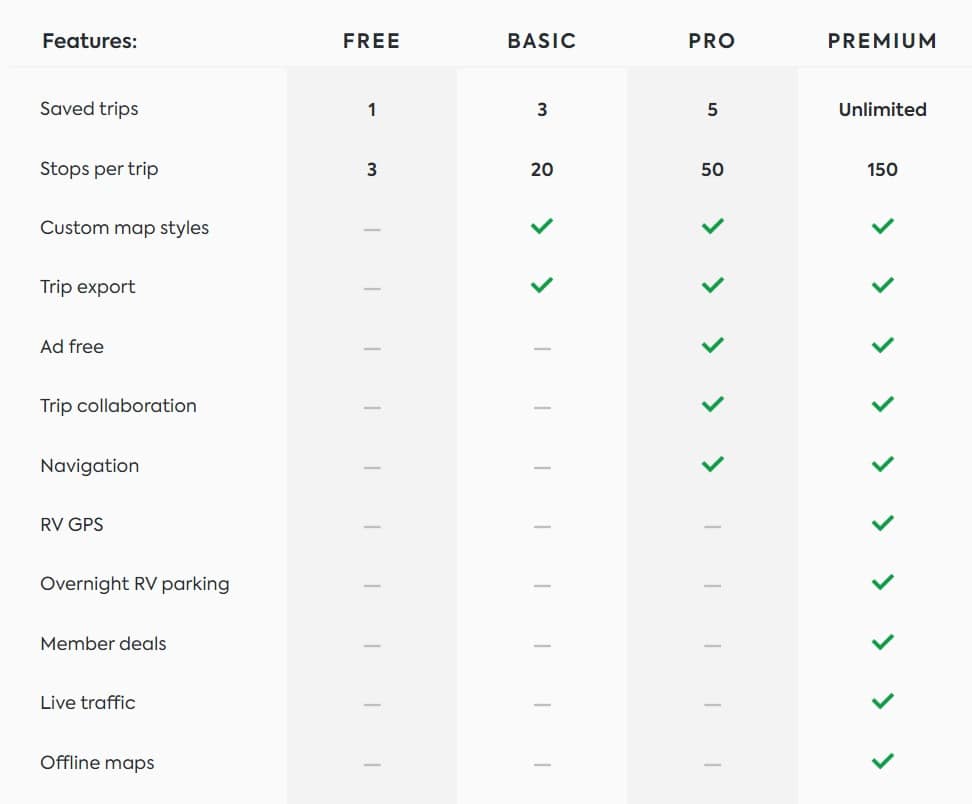
If you like to camp, RV, or just spend lots of time on the road, the Roadtrippers Premium plan is your best bet because of all the great features designed specifically for you. The Basic and Pro plans [see above] are good options if you don’t need as many tools for trip planning.
When you sign up you’ll also get a FREE 7-day trial of the Roadtrippers Premium plan so you can take it on a test drive. Check out the list of Premium features below. They’re available for less than the cost of a dinner date for two.
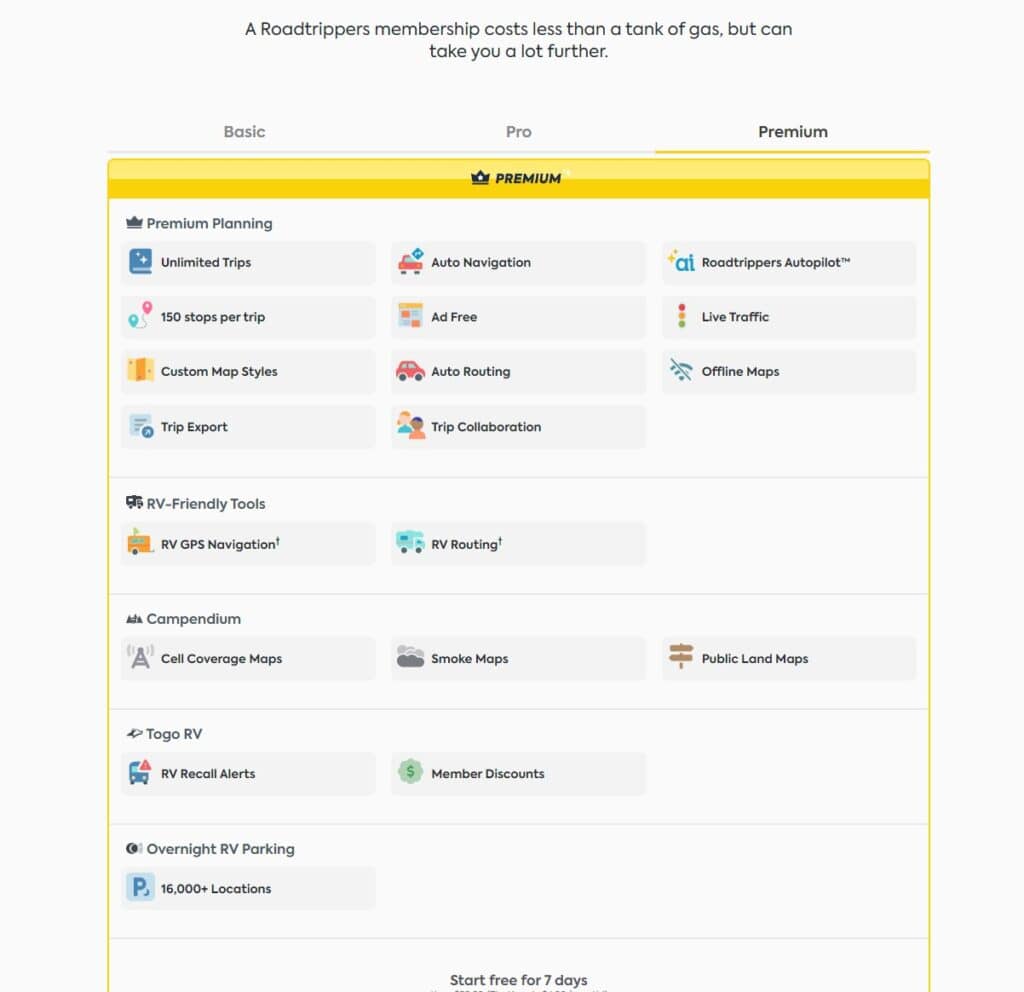
Send me an email or message me on my socials if you have questions about the Roadtrippers trip planner. I’m not sure I’ve even scratched the surface when it comes to using all the features.
Booking your trip? Here are some of the resources I use myself:
-Book great deals on flights with Cheap-o-Air
-Discover cool lodging with Booking.com
-Find the best prices and perks for cruises at CruiseDirect.com
-Reserve your vacation home rental with VRBO
-Book your car rental with RentalCars.com
-Buy your travel insurance with InsureMyTrip
-Book unique travel tours with Get Your Guide and Viator
-Find delicious culinary experiences with EatWith
-Find even more of my favorite travel resources here.
When you use these links I earn a small commission, at no extra cost to you. This helps me pay the bills and allows me to continue to create and share free tips and advice to help you travel better. As an Amazon Associate I earn from qualifying purchases.
Photo credits:
- Colorado mountain road – Photo by Nancy Hann – all rights reserved
- Scooter at EV Charging station – Photo by Ather Energy on Unsplash
- Camping full sign – Photo by Florida-Guidebook.com on Unsplash
- White RV on the road – Photo Aston Yao on Unsplash