The life of a finance professional can sometimes feel like “Groundhog Day”: every day, week, and month-end, you’re performing the same repetitive tasks that make you want to smash a radio every time you hear a Sonny & Cher song. Bill Murray needed to develop selflessness and empathy to escape his hellscape; your path to salvation is much easier.
Finance automation software is your ticket to freedom: technology that can help you streamline reconciliations, accelerate financial close, automate accounts payable, and expedite expense management. I’ve researched, tested, and vetted the best finance automation software on the market to bring you the top tools for every business stage.
Are you ready for an early, automated spring?
The 9 best finance automation tools
-
Zapier for AI orchestration
-
QuickBooks for product-based businesses
-
NetSuite for enterprise resource planning
-
BILL for small business accounts payable/receivable
-
Stampli for accounts payable
-
Tipalti for global vendor collaboration
-
Ramp for spend management
-
PayPal for transaction management
-
Wave for budget-friendly invoicing
What makes the best finance automation software?
How we evaluate and test apps
Our best apps roundups are written by humans who’ve spent much of their careers using, testing, and writing about software. Unless explicitly stated, we spend dozens of hours researching and testing apps, using each app as it’s intended to be used and evaluating it against the criteria we set for the category. We’re never paid for placement in our articles from any app or for links to any site—we value the trust readers put in us to offer authentic evaluations of the categories and apps we review. For more details on our process, read the full rundown of how we select apps to feature on the Zapier blog.
Finance automation is a broad umbrella rather than a distinct product, which can make it difficult to find a solution that fits your exact needs. There’s invoicing software, accounts payable platforms, small business accounting tools, business automation software, and several other subsets that span the financial ecosystem.
In an effort for equal representation, I made sure my list included the greatest hits across the industry. So, if you’re a small business that needs help with accounts payable, I have that. If you’re an enterprise-level organization that wants to streamline vendor management, I have that too. Think of this write-up as a virtual Baskin-Robbins, where you can find the perfect flavor for your finance team.
To further refine my list, I evaluated each software option with the following in mind:
-
AI and automation: Most software today offers some form of AI and automation, but capabilities vary wildly. Some products offer generic chatbots or frivolous features that feel tacked on just to meet a quota and keep the board of directors happy. Others feature truly revolutionary AI and automation capabilities that make a massive impact on your business. When evaluating products, I prioritized tools where AI drives ROI.
-
Integrations: Many businesses today are swimming in software—they may use an app for team communications, one for vendor collaboration, one for CRM, one for financial planning, and everything in between. I ensured every option on this list has substantial integration capabilities—natively or through Zapier—so you can connect your entire tech stack under one automated roof.
-
Data security: While all business data is sensitive, financial information requires serious protection. The apps I chose needed to demonstrate strong security measures, such as comprehensive audit trails and role-based access, to help keep your books audit-ready and secure. But keep in mind that not all of these apps have the same level of bank-grade protection, and you should only pass sensitive data through platforms that meet your specific compliance standards.
The best financial automation software at a glance
|
Best for |
Standout feature |
Pricing |
|
|---|---|---|---|
|
Zapier |
AI orchestration |
AI copilot to build workflows with natural language |
Free plan available; from $19.99/month |
|
QuickBooks Enterprise |
Product-based businesses |
Advanced Pricing that automates pricing models |
From $2,210/year |
|
NetSuite |
Enterprise resource planning |
AI Advisor that integrates AI across the app |
Contact for pricing |
|
BILL |
Small business accounts payable/receivable |
Auto-send invoicing |
From $49/user/month |
|
Stampli |
Accounts payable |
In-app team and vendor communication |
Contact for pricing |
|
Tipalti |
Global vendor collaboration |
Automated vendor tax verification |
From $99/month |
|
Ramp |
Spend management |
AI-powered expense approvals and analysis |
Free plan available; from $15/user/month |
|
PayPal |
Transaction management |
Customer/vendor-facing AI agent |
Commission-based pricing |
|
Wave |
Budget-friendly invoicing |
Automated Transaction Categorization to sort expenses |
Free plan available; from $19/month |
Best finance automation software for AI orchestration
Zapier (Web)

Zapier pros:
-
Comprehensive workflow builder
-
8,000+ apps and integrations, including QuickBooks, NetSuite, PayPal, and Wave
-
Built-in tools for AI agents, AI chatbots, databases, and forms
Zapier cons:
Zapier is an AI orchestration platform, so it’s a little different from the other tools on this list. You can’t create invoices, bill clients, or balance your books directly on the platform, but you can facilitate all those actions. It’s the automation layer that connects all your tools, putting an end to your repetitive tasks.
It all starts with the workflow builder, your hub for linking 8,000+ apps and creating AI-powered sequences. You can build a no-code financial workflow from scratch—no developers required—or use Zapier Copilot, an intelligent assistant that can automatically build what you need based on plain-English instructions.
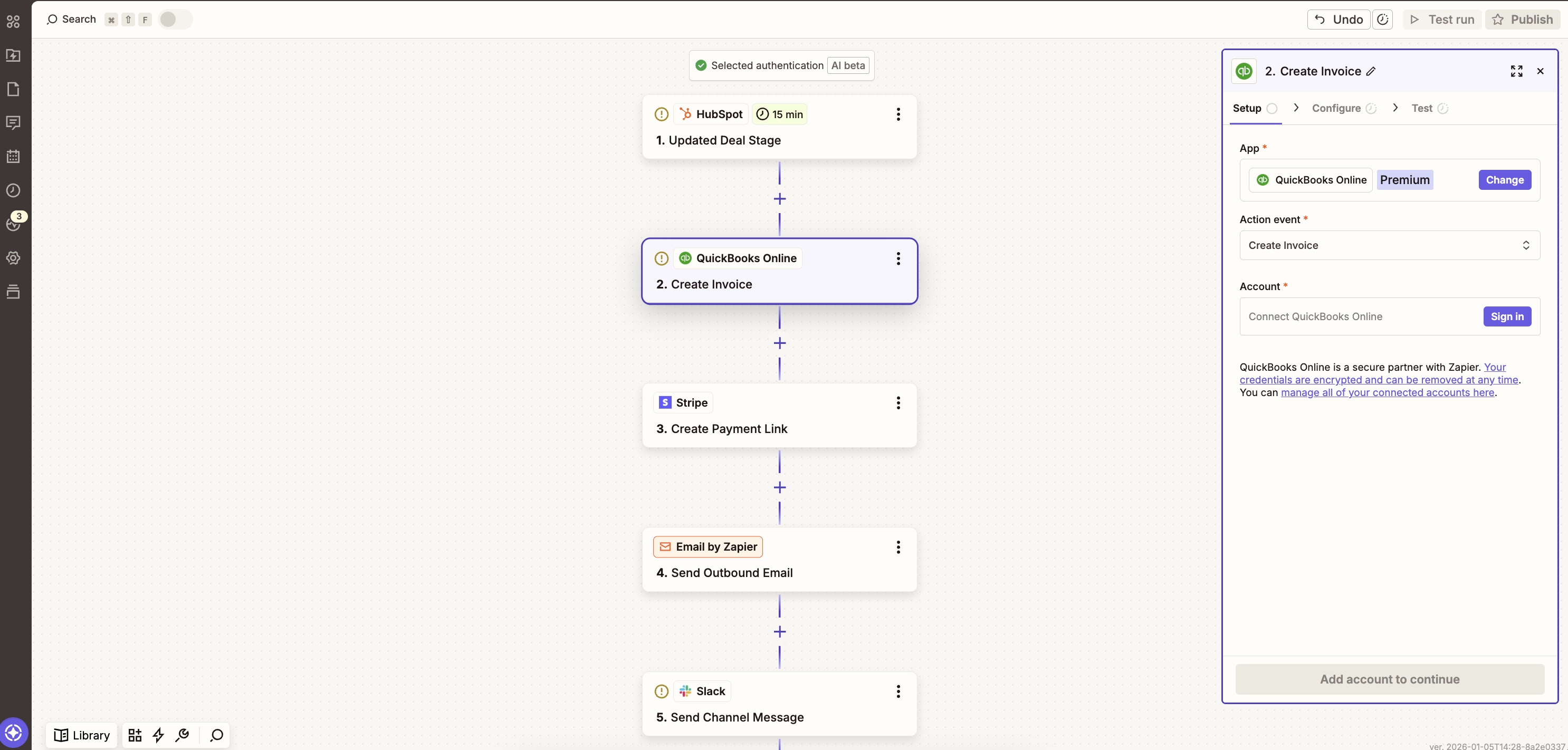
For example, when a member of your team marks a deal as “closed” in HubSpot, your Zapier workflow could automatically generate an invoice in QuickBooks, create a Stripe payment link, email that information to your new client, and send a Slack message to notify your finance team. You could add human-in-the-loop checkpoints along the way, or trust the system to work its magic (which it does, time after time).
Need inspiration? Explore Zapier’s workflow templates, which you can use directly or tweak to fit your needs. You can also check out our complete guides on using Zapier to automate invoicing or accounting.
Since you’re on the Zapier blog, it may be hard to take our word for it—so don’t. Listen to businesses that have found success with Zapier.
Zapier pricing: Free plan available, Professional ($19.99/month, billed annually), Team ($69/month, billed annually), Enterprise (contact Zapier)
Best finance automation software for product-based businesses
QuickBooks Enterprise (Web, iOS, Android)
QuickBooks Enterprise pros:
-
200+ built-in reporting templates
-
Advanced Pricing automates complex pricing rules (depending on plan)
-
Up to 40 different users for large teams (depending on plan)
QuickBooks Enterprise cons:
QuickBooks Enterprise is like a Toyota Corolla; it’s not flashy, but it’s reliable, practical, and built to fit your needs for a long time. It’s the upgraded version of vanilla QuickBooks—perfect for businesses that have outgrown the base functionality and need a little more punch for their financial department.
You can still do a lot of the same things in Enterprise that have made QuickBooks so popular. Built-in payroll allows you to manage payroll and accounting in one place. Integrated payments help you get paid faster and keep transactions tied to invoices. Plus, 200 different integrations allow you to sync systems like your CRM, inventory management, and other points in your eCommerce pipeline.
Where Enterprise really spreads its wings is with the added automation features you won’t find in the base product. It comes with 200+ built-in reports—including standouts like item profitability and invoice profitability—so you can spend less time gathering data and more time analyzing it.
If you’re a business with physical inventory, Advanced Inventory can help automate your logistics. With just a few clicks, you can manage vendors, monitor freight and duties, calculate landed costs, and avoid questions like, “Wait, where is this shipment going again?”
Another key feature of QuickBooks Enterprise is the Advanced Pricing. If you have multiple SKUs, you may have multiple pricing models—you could offer volume discounts, apply markdowns, use sales and promotions, or even have different pricing depending on who’s ordering (e.g., high-value customers). You need to set the rules, but once you do, QuickBooks automatically applies the right price based on those parameters.
All in all, QuickBooks Enterprise is a reliable product that’s best suited for businesses with physical inventory. It doesn’t provide an impressive amount of integrations, but you can overcome that by connecting QuickBooks to Zapier—try syncing your payment processor, CRM, and Slack channels to keep your team on the same financial page. Learn more about how to automate QuickBooks, or get started with a pre-made template.
QuickBooks Enterprise pricing: Gold ($2,210/year), Platinum ($2,717/year), Diamond ($5,363/year)
Best finance automation software for enterprise resource planning
NetSuite (Web, iOS, Android)
NetSuite pros:
-
Predictive analysis and forecasting
-
Comprehensive AI features
-
Enterprise-grade security
NetSuite cons:
-
Steep learning curve
-
Non-transparent pricing
NetSuite is a true-blue enterprise resource planning (ERP) platform. So, if you’re a small business owner who simply wants help processing invoices and managing a few accounts, NetSuite will make you wonder if you’ve just been jettisoned to Mars. But if you’re a larger operation with the needs to match, NetSuite will make you feel right at home.
The software has so much to offer that it’s hard to summarize it in only a few paragraphs. Starting with the accounts payable (AP) features, you can access a dedicated, customizable dashboard that lets you monitor purchase orders (POs), invoices, and scheduled payments from a real-time interface. No more scanning through email chains or chat messages; it’s all right where you can see it. With Intelligent Payment Automation, you can set up a hands-free system to pay and schedule bills, track payments, and automate GL entries. In other words, you never have to ask yourself if you’ve paid your invoices yet—you know you have.
As I dove deeper into the NetSuite AI rabbit hole, I became more impressed. The platform features an AI Advisor that can support your team across the entire product suite. You can use predictive planning to analyze large datasets and automatically spotlight trends, apply predictive forecasting to improve financial planning accuracy, or even build an AI agent and customize the format, tone, and creative responses via the NetSuite Prompt Studio.
The NetSuite Connector allows you to sync all your other tools. It prominently displays compatibility with eCommerce tools like Shopify, marketplace platforms like eBay, and CRMs like Salesforce—allowing you to link your sales funnel from top to bottom.
On the data security front, NetSuite offers enterprise-grade security features, such as strong encryption, role-based access controls, and password policies. The software is also audited to SOC 1 Type II and SOC 2 Type II and is certified for ISO 27001:2013 and PCI DSS, among others.
If you decide to go with NetSuite, expect a learning curve; it’s a massive system that could take you weeks to fully explore. But it’s a solid option for larger teams—and one you can integrate with Zapier to enhance your marketing efforts, streamline accounting, automate team collaboration, and build better workflows. Learn more about how to automate NetSuite, or get started with a pre-made template.
NetSuite pricing: Contact for pricing.
Best finance automation software for small business accounts payable/receivable
BILL (Web, iOS, Android)

BILL pros:
BILL cons:
Let me just lay it all on the table: BILL is delightful. It’s an automated finance tool that excels in accounts payable/accounts receivable (AR) with an extremely easy-to-use interface to boot. As I was testing, it had me chanting “BILL!” like I was watching the intro to “Bill Nye the Science Guy.”
Starting with AP, BILL can automate your approval process by tracking steps, sending reminders, and monitoring who approved what, so your system keeps running without you having to babysit it. The company also advertises that the platform can pay up to 2,000 bills at one time—a figure I found equal parts terrifying and awe-inspiring.
As someone with a burning hatred for repetitive invoices, what I found most impressive is the automated invoicing features. BILL can automate two- and three-way matching, check invoices against POs, and capture key invoice fields with 95% accuracy. In other words, the invoices you’ve filled out thinking, “Why can’t this be automated?” finally can be.
The AR features are a bit less flashy but equally as useful. BILL allows you to create and customize invoices, schedule and auto-send them, track them, and nudge your customers when payments are overdue. The “nudge” is a polite email follow-up, which is probably better than my approach, which is to send a message with the subject line, “Why haven’t you paid this yet?”
Automation features come into play via integration capabilities with the rest of your tech stack. BILL can sync with the hits like QuickBooks, NetSuite, Workday, ADP, and many other popular tools. While you can’t exactly build your own workflows, simply syncing these systems can streamline your workday.
Overall, BILL is an easy-to-use finance automation platform that makes small-business AP/AR feel less chore-like. It even includes multi-layered security and AICPA SOC 2 compliance to keep your data safe. So, if you’re looking for a no-nonsense system to streamline your team, BILL is worth considering.
BILL pricing: Essentials ($49/user/month), Team ($65/user/month), Corporate ($89/user/month), Enterprise (contact for pricing)
Best finance automation software for accounts payable
Stampli (Web, iOS, Android)
Stampli pros:
Stampli cons:
Stampli is a procure-to-pay platform that specializes in AP, payments, and vendor management. The entire ecosystem is integrated with Billy, Stampli’s “AI employee” that can guide you with just about any process.
One of Stampli’s standout features is that all communication happens entirely within the app. Without a standardized platform, AP teams often juggle multiple conversations spanning text messages, phone calls, emails, and carrier pigeons, leading to missed information and inaccurate invoices. Stampli keeps all communication linked with the invoice itself, so no one is confused or left out of the loop come payment time.
The invoicing process is just as easy, thanks to our friend Billy. That little AI rascal can automatically extract key invoice data and prepare documents for your AP teams, reducing manual data entry and errors. If you’d rather have a set of human eyes on your operations, Stampli offers drag-and-drop uploading to help your team populate invoices faster. Other notable AI features include two- and three-way line-level PO matching, managing employee information requests, and validating compliance.
Integration-wise, Stampli favors ERPs, offering access to 70+ platforms, including Sage, Microsoft, and SAP. While nice to have, the integrations seem pretty thin compared to some of the other options on my list (and Stampli doesn’t connect with Zapier, so you can’t boost that number, either). The security features, on the other hand, are pretty robust: SSO, audit trails, and software development lifecycle (SDLC) security round out a solid platform.
If you’re in the market for a comprehensive AP platform, give Stampli a try.
Stampli pricing: Contact for pricing.
Best finance automation software for global vendor collaboration
Tipalti (Web, iOS, Android)
Tipalti pros:
-
Supports global clients across almost every country and 120 currencies
-
Self-onboarding vendor process
-
KPMG-certified tax compliance
Tipalti cons:
Do you have a freelancer in France? A supplier in Sweden? A hyper-specific vendor in Vietnam? Tipalti can help you navigate different currencies, tax regulations, W-9s and W-8s, and bank fees as easily as checking off your to-do list.
I quickly realized one of the main things that makes Tipalti so special is its ability to stop payment problems before they even start. When a Tipalti user takes on a new vendor, that vendor needs to complete a self-onboarding process. That process requires the vendor to submit their tax documents (from whatever country they are in), and Tipalti automatically verifies the information. So, before that vendor can even think about collaborating with you in goods and services, they must have their tax information sorted and verified. You hear that noise? It’s the sound of your audit-obsessed accounting team breathing out a big sigh of relief.
When it’s time to submit payments, Tipalti’s mass payment feature automates the entire workflow. You can link your tech stack via APIs that support key software like ERPs, accounting platforms, HRIS, and payment processors. Once your system is set up, Tipalti Pi (the AI engine) handles automated exchange rate management, real-time reporting, and built-in tax compliance, focusing on W-9, W-8, VAT, SIN, BN, and DAC7 reporting.
Overall, I found Tipalti’s finance automation features to be extremely useful, and I only covered the tip of the iceberg. I wouldn’t recommend it to small or even mid-sized businesses that only work with domestic vendors. But if you have a large-scale organization that deals with international vendors, you can’t do much better than Tipalti.
Tipalti pricing: Select ($99/month), Advanced ($199/month), Elevate (custom pricing)
Best finance automation software for spend management
Ramp (Web, iOS, Android)
Ramp pros:
Ramp cons:
-
Requires a minimum cash balance of $25,000
-
Limited international support compared to other products on this list
Ramp encapsulates a lot of financial areas, including corporate cards, accounts payable, expense reports, and purchasing. However, the platform really excels in expense management; it’s kind of like your dad scrutinizing your bank statements in college, asking why you’re spending so much money at Target or regularly paying $15 for a hamburger when McDonald’s is right down the road from your apartment.
The Ramp spend management system is pretty ingenious. Before you issue a single corporate card, your finance team can set spending limits, block merchants, and restrict categories. When an employee makes a purchase, Ramp captures all relevant information, makes edits (if needed), and sends the receipt to the appropriate expense team via SMS, Slack, or Microsoft Teams. Ramp can also provide automated suggestions to your team, so they can either approve purchases in a single click or analyze the receipt for discrepancies.
But beyond the world of simple expense management lies an entire AI-powered ecosystem. Ramp’s AI agents are like a round-the-clock finance team that can scrutinize every cent that goes in and out of your accounts. These agents can automatically handle low-risk approvals and flag any high-risk entries that need human review. They can analyze your team’s spending across designated categories and flag areas where you’re spending too much. They can even catch fraud, validate invoices, and answer questions over text—kind of like your dad back in the day.
The platform integrates with 160+ tools, including NetSuite, QuickBooks, Workday, and Xero. It also offers security features like SSO and data encryption. You can even set up a virtual credit card for a single vendor, so that card only works for them, thereby limiting potential fraud or asset risk.
Like most software on this list, Ramp offers a host of financial capabilities. That said, if you want to hone in on your spend management, it’s hard to find a stronger option.
Ramp pricing: Free plan available, Plus ($15/user/month), Enterprise (Custom)
Best finance automation software for transaction management
PayPal (Web, iOS, Android)

PayPal pros:
-
Global acceptance across 200+ markets and 25+ currencies
-
AI agent transaction management
-
Trusted brand for vendor or customer ease-of-mind
PayPal cons:
PayPal has a couple of unique attributes. First, it has powerful brand recognition; that big “P” logo can put a client at ease, which is especially helpful if you’re a small business sending or receiving payment from someone new. Second, it’s more than a personal wallet (which is why it became famous, you could argue)—it can also be a full-scale transaction engine.
PayPal organizes its offerings into three tiers: solopreneur, small business, and enterprise. Solopreneurs and small businesses can use invoicing/payment management, seller protections, checkout integrations, and flexible loan funding. The enterprise solutions get a bit juicier, with expanded features like global payment management and automated payment orchestration.
Now, if you had asked me a few months ago if I thought PayPal should be on this list, I’d probably say no. But due to my industry connections and a well-timed press release, I’ve uncovered new features that may already be live by the time you’re reading this.
PayPal is rolling out agent-driven commerce experiences in 2026. The standout feature for me is an AI agent that you can implement on your checkout pages across apps. So, if one of your customers or vendors asks a question on your website, app, or other supported channel, an AI agent can step in and help them.
Internally, PayPal is also introducing upgraded purchase, seller, and fraud protection solutions that will streamline identity verifications and payment disputes.
You can integrate PayPal with accounting systems like QuickBooks, marketplaces like Etsy, and eCommerce platforms like Shopify, to name a few. For even more capabilities, connect PayPal with Zapier to build multi-step workflows across your tech stack—like sharing new sales on your Slack channel or automatically adding new contacts to your CRM after PayPal transactions. Learn more about how to automate PayPal, or get started with a pre-made template.
PayPal pricing: Commission-based pricing; fees start at $0.49, plus 1.5% to 3.49% per transaction
Best finance automation software for budget-friendly invoicing
Wave (Web, iOS, Android)

Wave pros:
Wave cons:
Wave is basically my childhood best friend. I used it for months early in my career and was instantly blown away by its ease of use and impeccable user experience. Coming back to it all these years later, it’s good to see that nothing has changed; in fact, it’s gotten better.
The product is a champion for small businesses. It equips solopreneurs and sparse teams with the tools that make them look bigger than their balance sheet.
The invoicing and payment system was Wave’s bread and butter when I first used the software, and it’s still strong. You can use it to quickly create invoices, build templates for recurring payments, and connect everything to your accounting functionality. Wave also offers other key capabilities related to payroll, expense management, and payment processing.
Like PayPal, Wave wasn’t initially on my list. Though I knew the product was useful, I wasn’t sold on the AI and automation capabilities until I reacquainted myself with the platform. Nothing here will blow your AI socks off, but there are simple things that can save you time and money.
Wave lets you set up recurring invoices for long-term clients and create automatic payment reminders for overdue invoices. With the Automated Transaction Categorization feature, you can even import and categorize bank transactions automatically—say goodbye to entering data manually.
The data security is adequate for such a simple tool. Wave is Level 1 PCI-DSS certified, offers 256-bit encryption, and boasts about its secure data storage procedures.
One area where Wave can feel limiting, however, is in its native integrations—there aren’t many useful options. That said, you could mitigate this by connecting Wave to Zapier, so you can get new invoice notifications on Slack, automatically transfer data to Google Sheets, or record sales directly in Wave. Learn more about how to automate Wave, or start with a template.
Wave pricing: Free plan available, Pro Plan ($19/month); online payments charged at a percentage plus a fixed rate
Other finance automation tools
While I strived to produce a strong, well-rounded list, a few other products deserve a shout-out. They’re great platforms that just didn’t find a spot on my list for one reason or another.
-
BlackLine: A cloud-based tool designed to help businesses automate their financial closes. It’s particularly useful for larger teams looking to centralize data.
-
Solvexia: A no-code system that assists finance teams in managing data and automating tax and compliance processes. It’s beneficial for teams that want to leverage AI and automation without needing a large dev team.
-
Xero: A small business accounting tool that can handle invoicing, expenses, and bank reconciliations. It’s great for freelancers or small businesses, and it offers over 1,000 integrations.
-
Brex: A financial platform that can automate expense management, bill payments, and even business travel arrangements. It’s an all-in-one spend management system that’s ideal for established teams.
Automate your finance workflows with Zapier
Deciding on a finance automation tool can feel like you’re relying on a groundhog. Are you ready to jump into the right product and experience an early spring? Or will your inaction cause six more weeks of non-automated winter?
Zapier is an AI-orchestration powerhouse that simplifies your finance processes, syncs with 8,000+ apps, and eliminates data silos across your organization—all without the need for developers.
Related reading: